Aperty vs Evoto AI: The Best AI Tool for Portrait Editing in 2026
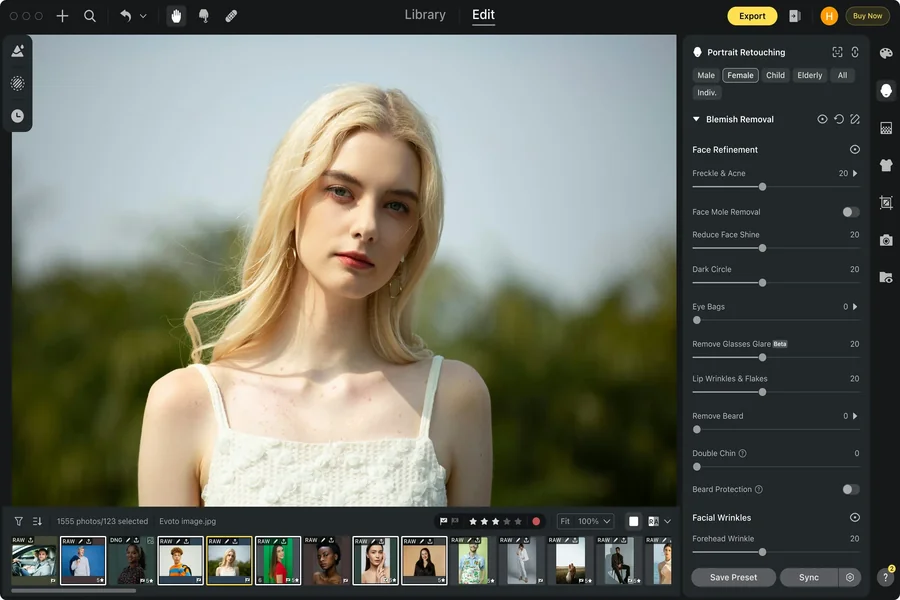
In 2026, clients expect clean, natural portraits fast, so using AI to edit photos has become mandatory. The modern software market is full of options, so photographers seek more than feature sets on checklists. They need a tool that will seamlessly integrate into their workflow, helping them provide consistent results within strict deadlines without compromising their creative vision.
Aperty and Evoto AI are two equally effective AI portrait editors, but which one fits you best? In this article, we will break down what each tool does best and where the trade-offs show up in real life. We will look at results, speed, control, and how each one fits different post-processing workflows.
Editing Philosophy
Aperty
AI photo retouching with Aperty is built around one idea: keep portraits believable. The tools are designed to protect natural texture and avoid unappealing plastic-like faces. Choose it if you want to maintain visual consistency across your brand. The realistic editing approach is especially effective for clean headshots, lifestyle sessions, and studio portraits.
Evoto AI
AI retouch with Evoto leans towards processing vast volumes of files at high speeds to match strict deadlines. When you are processing large sets and need the same look across dozens (or hundreds) of files, you can rely on this editor to deliver strong results quickly. Event workflows and high-output studios will benefit from this speed-first concept, but note that you may spend more time dialing the results back to match your personal style if you want some artistic experiments.
Core Retouching Capabilities and Workflow
Aperty
Aperty leans on detailed face mapping (up to ~4,000 facial points). That is why it is the best portrait retouching software for small changes like under-eye correction, subtle reshaping, or makeup tweaks. These details remain precise and consistent across different angles. Advanced tools like frequency separation ensure natural skin textures remain intact while you are fixing minor color inconsistencies or removing blemishes. If you shoot a small session, you usually enhance photos with AI for a fast base result and then tweak your edits manually for more polished and intended looks. Aperty tends to aim for subtle polish that holds up when you zoom in or deliver prints.
The editor includes batch processing, but it is usually strongest when you want the batch to stay natural. Choose it if you plan to spot-check key areas (eyes, T-zone shine, neck color) rather than trust a heavy automated look.
Evoto AI
Evoto focuses on quick, “one size fits all” AI retouching. It is sufficient for most large projects where the real goal is consistency: the same skin tone, the same contrast, the same level of polish across a whole set. Evoto shines when you want an aggressive first pass that gets you 80–90% of the way there fast, without controlled and natural-looking micro-adjustments for every specific image.
Learning Curve and Accessibility
Aperty
Aperty is a beginner-friendly portrait photo editing program. It is built around a clear portrait-focused workflow. New users can find the main tools quickly and understand what each slider is meant to improve. The layout encourages small, controlled changes. If you are coming from Lightroom or other common tools, the transition feels natural. You can dial back automation and refine details more deliberately, developing a unique creative style. Aperty tends to grow with the photographer: beginners get clean results quickly, while more experienced users gain confidence adjusting finer detail.
Evoto AI
Evoto AI often feels faster at first launch because it pushes you toward automation straight away. This approach ensures a quick output with minimal decisions. However, when photographers want to move beyond the default style, some controls feel less transparent, which can slow down learning over time.
Read More: AISaver vs Other Face Swap Tools Why It’s the Best AI Video Face Swapper in 2025
Pricing
Aperty
The software supports batch workflows and can also plug into tools many photographers already use (Lightroom Classic / Photoshop), which helps when you want a fast retouch pass without breaking your existing process. The annual subscription costs approximately $175, and the perpetual licence is available for approximately $265.
Evoto AI
Previews in Evoto are free, but exports typically use credits (their support docs explain that credits are deducted at export, commonly one credit per exported photo). This model is convenient for occasional uses, but if you have a limited budget and export a lot, the credit system can be daunting. There’s also a monthly subscription option listed in Evoto’s billing help (for example, $9.99/month with 50 credits via App Store (prices may vary depending on your region).
Conclusion
If you want portraits that stay natural up close, with more control over subtle details and a predictable workflow, Aperty is usually the safer fit. If your priority is pushing large sets through fast and you are comfortable managing exports and credits, Evoto AI can make sense. Define your deadlines, your style, and the kind of client feedback you want to avoid, and use the recommendations from our guide to choose the software that fits you best.