Best Background Eraser AI for Clean Cutouts Without Photoshop
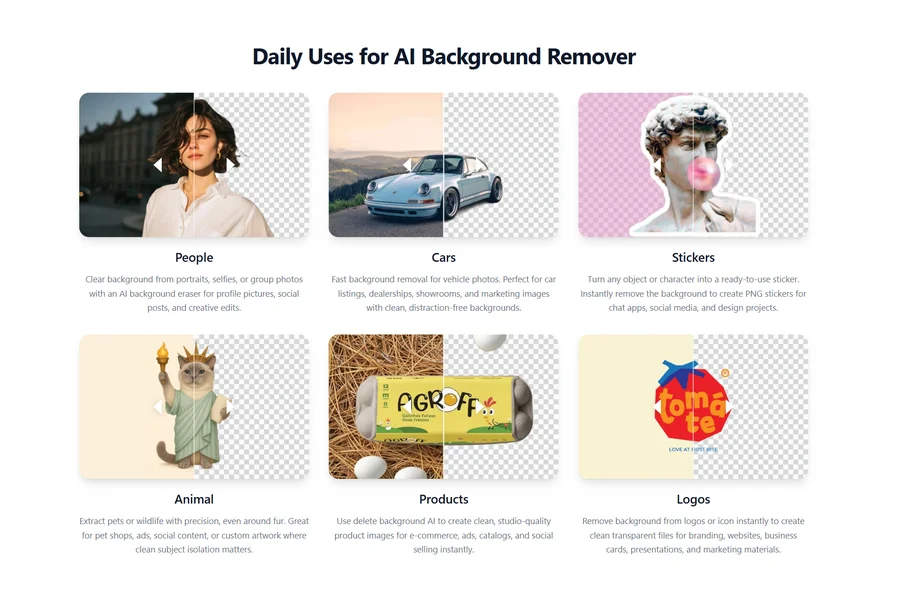
Previously, it took hours to create a clean image cutout using professional editing software such as Photoshop. The designers were required to manually trace the objects, smooth out the edges and carefully cut away any unnecessary backgrounds to get natural looking images. Artificial Intelligence has revolutionized that process now. With a modern Background Eraser AI, you can easily select the person you want to remove the background from a picture in a few seconds and get the image ready to go.
From editing product photos to making marketing content to social media posts to presentations, AI background removal is a quick and easy tool. Professional looking cut-outs can be created without any advanced editing skills.
There are countless AI tools out there now that are available online, and it’s important to know what sets the best platforms apart and how you can select one that satisfies your editing requirements.
Why AI Has Become the Preferred Choice
The classical background removal technique was tedious, time-consuming, and demanded expertise in image editing programs. When working with hair, transparent objects or edges with fine details, even simple tasks might become challenging. AI has streamlined this process to a great deal.
The software will automatically identify the dominant object in the image, and remove the background that does not contain the subject, without manual intervention. Process is quick, repeatable and easy to use for all users. This automation enables businesses and creators to create professional images without investing in complex editing methods.
What Makes a Good AI Background Eraser?
Not every Background Eraser AI performs the same way. Some tools focus on speed, while others prioritize image quality and edge accuracy.
When comparing different AI platforms, pay attention to features such as:
- Accurate subject detection.
- Smooth edges around hair and clothing.
- High-resolution image exports.
- Fast processing speed.
- Support for transparent PNG downloads.
- A simple and intuitive interface.
A tool that combines these qualities can make background removal much more efficient, especially if you edit images regularly.
Clean Cutouts for Product Photography
Many online shoppers read the description after looking at the image. Product photos that are clean will help make the product look professional and will also enable customers to make a 100% focus on the product being sold.
The AI background removal feature allows you to easily isolate products from distracting backgrounds. After subtracting the background, the product is then ready to be put in a white background, a branded design or a promotional graphic without the need of another photo shoot.It gives online vendors a uniformity of appearance throughout the product line.
Read more: Why More UK Travellers Are Choosing Active Winter Breaks
Improving Images for Marketing Projects
Images that seamlessly integrate into various designs are often needed for marketing materials. A Background Eraser AI can be a designer’s and marketer’s ally for creating product images, portraits, and promotional graphics for reuse on websites, email marketing campaigns, ads, brochures and social media.
Since the background has already been changed, multiple campaigns can be easily run on one edit without having to repeat the editing process. This will save time and won’t need to sacrifice uniformity of visuals throughout the marketing mix.
Choosing Better Photos Before Editing
The quality of the image is crucial for the success of the AI. The software tends to process light, high contrast photos with a hard focus better. High resolution images also capture more detail around edges, that is, the cut-outs are cleaner.
While AI can resolve numerous difficult scenarios, a good photo is often the foundation for a great result. You can save a lot of time for further editing later if you get a good shot in the first place.
Comparing AI Tools Beyond Speed
Fast processing is useful, but it shouldn’t be the only factor when choosing a platform. Some AI tools generate results almost instantly but may leave rough edges or remove important details. Others spend slightly more time processing while producing cleaner, more natural-looking cutouts.
When testing different platforms, compare:
- Edge quality.
- Detail preservation.
- Background reconstruction.
- Overall image clarity.
- Export quality.
Evaluating these areas helps identify which tool consistently delivers professional results.
Everyday Uses Beyond Business
Background removal isn’t limited to commercial projects. Many people use AI to prepare profile pictures, create invitations, design greeting cards, edit travel photos, build school presentations, or organize family photo albums.
Removing distracting backgrounds often makes personal images look cleaner and more polished without requiring complicated editing software. Because the process is so simple, AI has become useful for both professional and everyday creative projects.
Avoiding Common Editing Mistakes
While most of the work can be done by AI, these are some simple habits that can enhance your results. Don’t upload poor quality or blurred images where possible. You should ensure that the subject is clearly in focus and is better than the background, and preview the final cutout before you download it.
Many AI tools provide a fast touch-up feature in case there are any minor imperfections around the edges that need fixing, but are easy to do in a short time. Such simple changes contribute to the improvement of images to be cleaner and more natural.
AI Background Removal Continues to Advance
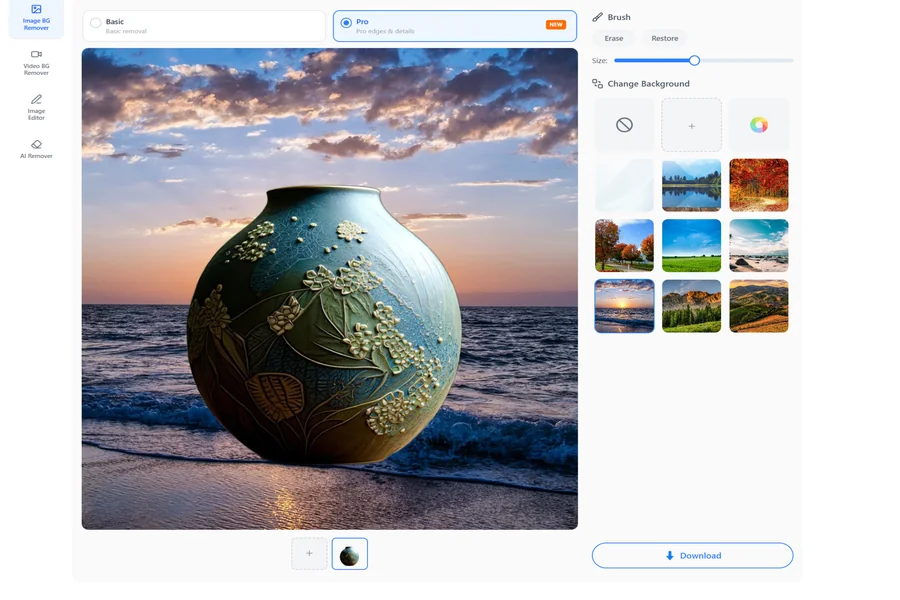
Artificial intelligence is improving rapidly, making image editing even more accurate. Future Background Eraser AI tools are expected to deliver better handling of fine hair, transparent objects, reflections, and complex textures. Many platforms are also combining background removal with AI image enhancement, object removal, color correction, and image generation in a single editing workspace.
As these technologies continue to evolve, users will be able to complete even more editing tasks without relying on traditional desktop software.
Conclusion
The Background Eraser AI makes it easy and convenient to remove backgrounds from images without the need for Photoshop or other sophisticated editing software. AI can automatically identify subjects and eliminate backgrounds to save time and deliver high-quality images for everyone — from businesses to designers, students to users — with professional results.
Word accuracy and use ease as well as quality and export capabilities are more important than speed when evaluating the various AI tools. When equipped with the appropriate system, it is a simple and fast task to make sleek, clear images which can be utilized for product photography, advertising and marketing, or simply for personal creative projects.