Touch Screen Monitors: The Future of Interactive Displays
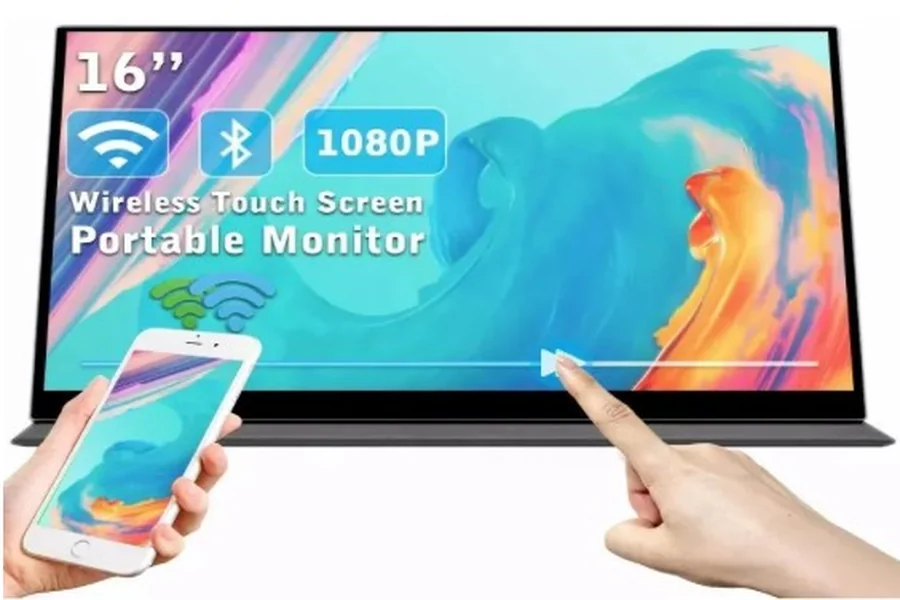
In the old days, we could only operate a computer using a mouse and keyboard. Those days are gone. Today, with touch screen monitors, we can talk to what we’re seeing on the screen. You might tap, swipe, pinch, or zoom-a lot like with a tablet or phone. That makes computers more convenient, faster, in so many more ways.
Touch screen monitors are everywhere these days. In the home, office, school, shopping mall, or even in your car. We use them in art or with computer games. These monitors offer a whole new world to us. Here we will learn about how touch screen monitors work, their categories, benefits, uses, and why they are becoming so popular.
Touch Screen Monitor:
A touch screen monitor is a monitor that recognizes the touch of your finger or stylus. Rather than placing a cursor using a mouse, you can use your fingers to tap the monitor so that you can open files, draw, scroll, or type.
Touch screens can be mounted on desks, computers, or even video game consoles. Most of the newer models come with touch screens, including tablets, smartphones, and 2-in-1 laptops.
How touch screen monitors work
Touch screens detect where and how you touch the screen. They contain sensors that respond to your finger, your stylus, or another touch device. There are several technologies that facilitate this, and they work slightly differently.
1. Resistive Touch Technology
- Consists of two thin layers with a small gap between them.
- When you press the screen, the layers meet and send an electrical signal to the computer.
- It is compatible with any object — finger, stylus, or even a glove.
- Less sensitive but cheaper.
- Usually in ATMs, ticket dispensers, and older touch screens.
2. Capacitive Touch Technology
- Uses the natural electrical charge on your finger.
- Switches the electrical field when pressed on the screen.
- Very sensitive as well as multi-touch gestures just like pinch to zoom or rotation.
- Operates using fingers or special capacitive pens without needing to work together.
- Common in high-end touch screen display monitors, tablets, and smartphones.
3. Infrared (IR) Touch Technology
- Has an unseen grid of infrared light beams on the screen.
- When touched, the beam is disrupted, and the sensors identify the location.
- Does not require any object, even gloves.
- Extremely durable and used predominantly in public presentations, kiosks, and interactive boards.
4. Optical Imaging Technology
- Utilize small cameras mounted on the corners of the screen to identify touch.
- Can detect fingers, styluses, or other bodies.
- Seems good on big screens like conference room screens.
5. Surface Acoustic Wave Technology
- Emitting ultrasonic waves on the screen surface.
- When touched, some of the waves is lost, and the position is read.
- Ensures high transparency and very good image quality.
- Most suitable for indoor application since dust or humidity may interfere with functioning.
6. In-Cell and On-Cell Touch
- B. Touts touch sensors in the display panel.
- Lightens and smoothes out the monitor.
- Utilized in several high-end 120Hz OLED monitors for a thin look.
Types of Touch Screen Monitors
Touch screen monitors are available in various sizes to suit various needs, ranging from mobile use to large business use.
1. Handheld Touch Screen Displays
- Light and thin for portability.
- Connect with MacBook, laptops, tablets, or smartphones via USB-C or HDMI.
- Ideal for remote work, games, and presentations etc.
2. All-in-One Touch PCs

- Put the computer and the monitor together in one.
- Save. Desk space and clutter of cables.
- Used in reception counters, offices, and homes.
3. Interactive Flat Panels

- Extremely large touch screens are installed in classrooms, conference rooms, and training facilities.
- Permit multi-touch for collaborative work.
- Typically equipped with smartboard functionality.
4. POS Touch Monitors and Retail
- Installed in service counters, restaurants, and shops.
- Launched for fast use and user interaction.
5. Industrial Touch Screen Monitors
- Weather and long-term tolerance for factory, warehouse, and outdoor use.
- Waterproof, dustproof, and tolerant to extreme temperatures.
6. Gaming Touch Screen Monitors
- Not common but increasingly popular for interactive games.
- 120Hz or 144Hz deliver smoother gameplay results.
- Others combine touch controls and OLED technology to deliver rich colors.
7. Medical Touch Screen Monitors
- Applied in hospitals for medical imaging, scans, and patient records.
- With anti-bacterial coatings and smooth, easy-to-clean surfaces.
Advantages of Touch Screen Monitors
There are numerous advantages to the use of touch screen technology:
-
Easy to Use
Direct interaction is easy for new users, children, and older people.
-
Faster Navigation
No mouse needed; screen tapping is quicker.
-
Space-Saving
Fewer accessories translate to less clutter on the desk.
-
Better for Creative Work
They can draw on the screen directly.
-
Multifunctional Applications
It can be used in gaming, education, retailing, and healthcare.
Drawbacks of Touch Screen Monitors
Although touch screens are handy, there are a few disadvantages to them:
-
Fingerprints and Smudges
Screen touch leaves fingerprints that must be cleaned away.
-
More Expensive
Touch screens cost more than standard monitors.
-
Less Comfortable for Long Use
Its extended use puts strain, which is known as “gorilla arm.”
-
Less Accurate Alternatives
Small touch targets are difficult to touch.
Important Features to Look for in a Touch Screen Monitor
When purchasing a touch screen monitor, look for the following features:
-
Screen Size
Select a size appropriate to your work style and space.
-
Resolution
Better images come from higher resolution. Full HD is fine, but 4K is better for fine work.
-
Touch Technology
Capacitive touch is best for smooth and accurate operation.
-
Refresh Rate
Developers and gamers are helped with high refresh rates such as 120Hz or higher.
-
Panel Type
IPS panels provide improved color and viewing angles.
-
Connectivity
Make sure that it is USB-C, HDMI, or DisplayPort capable.
The Advent of OLED 120Hz Displays
The past two years have seen OLED 120Hz monitors as a high-end favorite among users. OLED is “Organic Light-Emitting Diode.” They produce brighter colors, darker blacks, and greater contrast than standard LCD monitors.
120Hz refresh rate is the screen refreshing 120 times a second. This equates to more fluid animation and improved response time for games, video editing, and interactive applications. Combining OLED quality and touchscreen functionality provides you with an excellent view and interactive experience.
An example of where an OLED 120Hz screen is perfect for:
- Professional video and image editing.
- Smooth gameplay without motion blur.
- Breathtaking presentations and design work.
Where Touch Screen Monitors Are Used
Touch screen monitors are used in many industries:
-
Education
Used in schools for student and lesson interaction.
-
Retail
Self-checkouts and product information kiosks.
-
Healthcare
Healthcare staff use them for instant access to patient records.
-
Hospitality
Hotels use them for digital menus and check-ins.
-
Gaming and Entertainment
Games or creative design software use touch controls.
Touch Screen Monitors vs Regular Monitors
Feature
- Touch Screen Monitor
- Daily Monitor
- Interaction
- Touch, stylus, gestures
- Mouse, keyboard
- Speed
- Faster for specific tasks
- May take longer
- Cost
- More expensive
- Reduce
- Usability
- Easy to use for beginners
- Needs more learning
Conclusion
Touch screen monitors revolutionized everything related to the use of computers and screens. They accelerate interaction, making it more natural and interactive. You are a game player, a designer, a teacher, or an entrepreneur; a touch screen will simplify your task and entertain you. With innovations like OLED 120Hz monitors, viewing is more dense and smooth than ever. As time goes on, day by day, touch screens will play an even more significant role in our lives.